
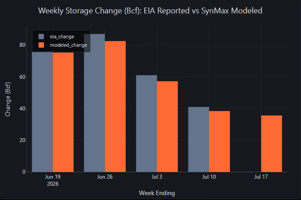
Headline: Injection modeled at +36 Bcf SynMax's S/D models point to a continuation of the trend of...
New Dataset: US Gas Demand
US Gas Demand
As promised, we are publishing our daily gas demand for today and past. This data includes detailed LNG flows by terminal. Dataset documentation page updated.
What's New
Hyperion Production Datalink now includes a two new tables: Sectoral Demand and LNG Feedgas Details
Sectoral Demand
US Gas Demand table (hdl.gas_demand) built from pipeline nominations, temperatures and EIA 930 data. This view provides daily, sector-level gas consumption and trade flow data, including:
- High Frequency Updates: updated every 30 minutes, with the latest pipeline data, as well as latest today temperatures.
-
Daily Granularity: Real-time tracking in Bcf/d (Billion Cubic Feet per day).
-
Geographic Detail: Grouped by CONUS (national level) and the 5 EIA storage regions (East, Midwest, Mountain, Pacific, South Central).
-
Sector Breakdown: Standardized demand categories including Residential, Commercial, Electric Power, Industrial, Lease & Plant Fuel, Pipeline & Distribution Use, and LNG Feedgas.
-
Trade Flows: Tracking of pipeline imports/exports (Canada, Mexico) and LNG imports.
Modeling Approach
More detailed notes on the individual models will be published in the coming days.
The SynMax natural gas demand models produce daily estimates of U.S. natural gas consumption at the regional and sectoral level. Coverage spans the five EIA gas storage regions and a national total for the four primary end use sectors (residential, commercial, industrial, and electric power). Because official EIA consumption data is released with a lag of roughly two months, the models provide a current view of demand that would otherwise only be available well after the fact.
For each of the primary sectors, the output model is an ensemble of two independent demand estimates. The first is derived from physical pipeline flow data (SynMax pipeline scrapes) and expressed as a probabilistic model. The second is a weather based model that captures the temperature sensitivity of heating and cooling load. These two signals are combined with structural regressors, and the combination is done separately for each region and sector using the functional form that best fits that sector's drivers.
-
Residential and Commercial demand is dominated by heating demand, so its primary inputs are population weighted heating and cooling degree days alongside the pipeline and weather signals. The ensemble forms a weighted blend of the pipeline and weather estimates and combines it with a degree day regression, then gates the two against heating conditions. The degree day response carries more weight in the winter season, and the blended signal carries more weight the rest of the year.
-
Industrial demand inputs consist of a pipeline signal, a weather signal that is clipped to remove temperature swings that do not belong in baseload demand, and a coincident index of economic activity. The ensemble combines these in a linear model, so the pipeline signal sets the level while the economic term captures slower trends.
-
Electric Power demand is estimated from the pipeline signal along with the cooling and heating response, including nonlinear degree day terms that capture the steep summer cooling curve. The day to day shape is then refined using observed power grid generation, which captures intra-month swings that pipeline flow and temperature alone can miss.
For these primary sectors, using two independent signals improves robustness, since an error in either source is unlikely to move the blended estimate on its own, and the degree of agreement between them provides a direct measure of confidence. Rounding out the US L48 S/D picture, SynMax has developed models for each of the remaining components:
-
Canadian cross-border trade reports daily US-Canada pipeline gas imports, exports, and net imports and is derived directly from metered border nominations. This gives a clean, high-frequency view of US-Canada pipeline trade that refreshes as soon as new pipeline data lands.
-
LNG Imports report daily grid sendout from US LNG import terminals built directly from pipeline nominations. It captures the winter peak-shaving flows, when terminals regasify stored LNG into the grid during cold snaps, that make imports a seasonal but locally important piece of US gas supply.
-
Mexican Exports are reported as a daily national estimate of pipeline gas exports to Mexico shaped by live US border-meter nominations, Mexican pipeline-import data, and weather.
-
LNG Feedgas reports daily gas demand at all nine major U.S. liquefaction terminals in Bcf/d, combining metered interstate pipeline nominations with Leviaton cargo-export observations and EIA-anchored levels. This lets us recover the unmetered Texas-intrastate supply at Corpus Christi and Freeport that public nominations miss — for a complete, high-frequency view of feedgas demand.
- Lease & Pant Fuel is derived from the Synmax daily natural gas production number.
- Pipeline & Distribution Use is a function of total daily demand.
For each of the above components, daily estimates are reconciled to the corresponding EIA monthly totals, keeping the series anchored to the official record while still responding to prevailing weather and pipeline flows.
Supplementing the LNG Feedgas table, the second new table available on the Hyperion Production Datalink breaks out LNG feedgas volumes by facility.
LNG Feedgas Details
hdl.lng_feed_gas provides daily natural gas feed gas deliveries (in Bcf/d) for all nine major U.S. LNG export terminals.
The SynMax Advantage: Modeled Intrastate Flows
A major challenge in tracking U.S. LNG feed gas is that several terminals—most notably Freeport and Corpus Christi—receive a significant portion of their supply via Texas intrastate pipelines, which do not post public daily nominations.
To solve this blind spot, SynMax applies a proprietary modeling methodology:
- We track all visible interstate pipeline deliveries to each terminal.
- We cross-reference these flows with Leviaton-observed real-time LNG cargo exports (Datalink 1002).
- We model the intrastate feed gas portion as the delta required to balance the observed physical exports and liquefaction fuel/shrinkage.
- The result is a complete, highly accurate daily feed gas volume that captures both interstate and intrastate pipeline supplies.
Data Access
You can query the tables directly through Hyperion Agents and the v4 api function query_datalinks. We will be making the data also available on the Synmax Datacenter, but that will take a bit longer. For more details on current access, please keep reading.
As usual, all datasets are documented here.
This document walks through common use cases with example agent prompts and the underlying SQL, followed by a full schema reference in the appendix.
Latest Total Gas Demand by Sector
How much gas is being consumed today across each sector and region?
Agent Prompt:
Show me the latest total gas demand by region and sector.
Query (using hdl.gas_demand):
SELECT date, region, demand_type, gas_demand_bcf_day
FROM hdl.gas_demand
WHERE date = (SELECT MAX(date) FROM hdl.gas_demand)
ORDER BY region, gas_demand_bcf_day DESC;
API Call:
curl -X POST "https://hyperion.api.synmax.com/v4/beta/query_datalinks" -H "Access-Key: $ACCESS_TOKEN" -H "Content-Type: application/json" -d '{"query": "SELECT date, region, demand_type, gas_demand_bcf_day FROM hdl.gas_demand WHERE date = (SELECT MAX(date) FROM hdl.gas_demand) ORDER BY region, gas_demand_bcf_day DESC"}'
Example Results:
|
date |
region |
demand_type |
gas_demand_bcf_day (Bcf/d) |
|---|---|---|---|
|
2026-06-19 |
CONUS |
Electric Power |
42.15 |
|
2026-06-19 |
CONUS |
Industrial |
22.40 |
|
2026-06-19 |
East |
Electric Power |
14.20 |
|
2026-06-19 |
South Central |
Electric Power |
15.85 |
|
... |
... |
... |
... |
Net Pipeline Imports
What are our net pipeline trade flows with Canada and Mexico?
Agent Prompt:
Show me daily net pipeline imports for CONUS for the last 30 days.
Query (using hdl.gas_demand):
SELECT
 date,
 SUM(CASE WHEN demand_type = 'Canada Pipeline Imports' THEN gas_demand_bcf_day ELSE 0 END) AS canada_imports,
 SUM(CASE WHEN demand_type = 'Canada Pipeline Exports' THEN gas_demand_bcf_day ELSE 0 END) AS canada_exports,
 SUM(CASE WHEN demand_type = 'Mexico Pipeline Exports' THEN gas_demand_bcf_day ELSE 0 END) AS mexico_exports,
 SUM(CASE WHEN demand_type = 'Canada Pipeline Imports' THEN gas_demand_bcf_day ELSE 0 END) -
 SUM(CASE WHEN demand_type = 'Canada Pipeline Exports' THEN gas_demand_bcf_day ELSE 0 END) -
 SUM(CASE WHEN demand_type = 'Mexico Pipeline Exports' THEN gas_demand_bcf_day ELSE 0 END) AS net_pipeline_imports
FROM hdl.gas_demand
WHERE region = 'CONUS'
 AND date >= CURRENT_DATE - INTERVAL '30 days'
GROUP BY date
ORDER BY date;
API Call:
curl -X POST "https://hyperion.api.synmax.com/v4/beta/query_datalinks" -H "Access-Key: $ACCESS_TOKEN" -H "Content-Type: application/json" -d '{"query": "SELECT date, SUM(CASE WHEN demand_type = '''Canada Pipeline Imports''' THEN gas_demand_bcf_day ELSE 0 END) AS canada_imports, SUM(CASE WHEN demand_type = '''Canada Pipeline Exports''' THEN gas_demand_bcf_day ELSE 0 END) AS canada_exports, SUM(CASE WHEN demand_type = '''Mexico Pipeline Exports''' THEN gas_demand_bcf_day ELSE 0 END) AS mexico_exports, SUM(CASE WHEN demand_type = '''Canada Pipeline Imports''' THEN gas_demand_bcf_day ELSE 0 END) - SUM(CASE WHEN demand_type = '''Canada Pipeline Exports''' THEN gas_demand_bcf_day ELSE 0 END) - SUM(CASE WHEN demand_type = '''Mexico Pipeline Exports''' THEN gas_demand_bcf_day ELSE 0 END) AS net_pipeline_imports FROM hdl.gas_demand WHERE region = '''CONUS''' AND date >= CURRENT_DATE - INTERVAL '''30 days''' GROUP BY date ORDER BY date"}'
Example Results:
|
date |
canada_imports |
canada_exports |
mexico_exports |
net_pipeline_imports |
|---|---|---|---|---|
|
2026-06-19 |
8.53 |
1.12 |
6.85 |
0.56 |
|
2026-06-18 |
8.42 |
1.05 |
6.90 |
0.47 |
Weekly Implied Storage Change
How do we calculate weekly implied storage changes to align with the EIA storage report?
To align with the official EIA Weekly Natural Gas Storage Report, daily supply and demand balances are aggregated into a Saturday-to-Friday gas storage week and assigned the corresponding Friday week-ending date.
Agent Prompt:
Calculate the weekly implied storage changes for the last 5 weeks.
Latest Daily Feed Gas by Terminal
Get a real-time snapshot of how much gas was delivered to each terminal on the most recent gas day.
Agent Prompt:
Calculate the latest daily LNG feedgas by terminal.
Query (using hdl.lng_feed_gas):
SELECT
 gas_day,
 terminal_name,
 ROUND(CAST(feed_gas AS numeric), 2) AS feed_gas_bcf_d
FROM hdl.lng_feed_gas
WHERE gas_day = (SELECT MAX(gas_day) FROM hdl.lng_feed_gas)
ORDER BY feed_gas DESC;
Use the Agent to Find Insight
The real gas_demand_bcf_day of these new datasets is evident when they're combined with the researching power of the Agent.
"Evaluate month to date national and regional (EIA gas storage regions) gas burns for power generation compared to June 2025 on a weather adjusted basis. Identify if the changes (if any) are caused by changes to gas prices, renewable generation, or overall electric load compared to last June. "
"Using the above dashboard as a starting point, I want to do a deep dive into how renewable generation is impacting gas burns regionally on a year-on-year basis for June. Use the EIA 930 data to look at hourly renewable generation trends and determine how it's impacting the thermal stack in each region. Also consider how batteries are playing a role. "
Renewables impact on thermal generation
Important Business Rules
- Units: All volumes are stored as Bcf/d (Billion Cubic Feet per day) as daily rates.
- Temporal Aggregation Rule: Because all gas_demand_bcf_days are daily rates, you must use AVG() when aggregating over time (monthly, quarterly, or weekly). To calculate cumulative volume over a time period, multiply the average rate by the number of days in that period. Use SUM() for spatial aggregation (adding multiple regions/terminals together on the same day).
- EIA Storage Regions: The region column contains CONUS and the 5 EIA storage regions ('East', 'Midwest', 'Mountain', 'Pacific', 'South Central'). Do not blindly sum across all regions or you will double count. Note that individual states are NOT present in this view.
- Trade Flow Signs: Pipeline and LNG imports are stored as negative numbers in the raw database (representing supply entering the system). When calculating total supply or net imports, make sure to multiply imports by -1.0 to represent them as positive supply volumes.
Appendix: Full Schema Reference
hdl.gas_demand
The default starting point — daily volumes by region and sector.
|
Column |
Type |
Description |
|---|---|---|
|
date |
date |
Gas day. Example: "2024-05-02" |
|
region |
varchar |
Geographic region (CONUS or one of the 5 EIA storage regions). Example: "South Central" |
|
model_scenario |
varchar |
currently only 'baseline'. |
|
weather_scenario |
varchar |
currently only 'baseline.' |
|
demand_type |
varchar |
Consumption sector or trade flow category. Example: "Residential" |
|
gas_demand_bcf_day |
float |
Daily volume in Bcf/d. Example: "12.4503" |
|
updated_at |
datetime |
Last update timestamp. Example: "2026-06-19 14:13:06.420440+00:00" |
model_scenario and weather_scenario are currently placeholders. As we look to release demand forecasts in the future, we will provide more details on the use of those fields.
Sector and Trade Flow Categories (demand_type):
- Residential: Residential retail consumption (highly temperature-sensitive)
- Commercial: Commercial retail consumption (highly temperature-sensitive)
- Electric Power: Gas consumed for electricity generation (highly temperature-sensitive in summer)
- Industrial: Gas consumed by industrial facilities (highly price-sensitive)
- Lease and Plant Fuel: Upstream lease fuel and processing plant fuel
- Pipeline & Distribution Use: Gas consumed as compressor fuel during pipeline transit
- Vehicle Fuel: Compressed/liquefied natural gas used for transportation
- Canada Pipeline Imports: Sourced from Canadian pipeline delivery points (stored as a negative number in source database)
- Canada Pipeline Exports: Sourced from Canadian pipeline receipt points
- Mexico Pipeline Exports: Sourced from Mexican pipeline receipt points
- LNG Imports: Sourced from LNG terminal regasification deliveries (stored as a negative number in source database)
- LNG Feedgas: Deliveries to US LNG export terminals for liquefaction and export
Schema Reference: hdl.lng_feed_gas
|
Column |
Type |
Description |
|---|---|---|
|
gas_day |
date |
Gas day for the feed gas observation. Example: 2026-06-19 |
|
terminal_name |
varchar |
Name of the LNG export terminal. Example: Sabine Pass |
|
feed_gas |
float |
Daily feed gas delivery volume in Bcf/d. Example: 4.50 |
|
updated_at |
timestamp |
Last update timestamp (UTC). Example: 2026-06-19 14:13:06.420440+00:00 |
Tracked U.S. LNG Terminals (terminal_name)
|
Terminal Name |
Region |
Primary Feed Pipelines |
|---|---|---|
|
Sabine Pass |
South Central (LA) |
Creole Trail, NGPL, Transco, KMLP |
|
Corpus Christi |
South Central (TX) |
Cheniere Corpus Christi Pipeline (modeled intrastate) |
|
Plaquemines |
South Central (LA) |
Gator Express, Venice Extension |
|
Cameron |
South Central (LA) |
Cameron Interstate Pipeline |
|
Freeport |
South Central (TX) |
Gulf South, KM Tejas, Texas Eastern (modeled intrastate) |
|
Calcasieu Pass |
South Central (LA) |
Transco (Venture Global) |
|
Cove Point |
East (MD) |
Cove Point Pipeline |
|
Elba Island |
East (GA) |
Elba Express |
|
Golden Pass |
South Central (TX) |
Golden Pass Pipeline (Commissioning) |