
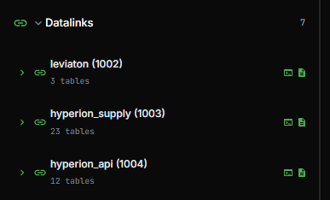
Just a quick note to mention that if you look at your datalinks:
Access Hyperion Data Like AI Does
We’re excited to announce a powerful new way to access SynMax data, query_datalinks. This new API endpoint provides direct, secure and flexible access to our datasets (including pipeline flow data that was previously only available via v3), giving you more control over how you query, aggregate, and analyze information.
Why Are We Doing This?
Traditional API endpoints are rigid. They limit your ability to filter our data to only predefined arguments, they return data in only one schema and they often force you to transform data post response.
If you’ve been using Agents, you’ve already seen this approach. query_datalinks uses secure SQL queries, the same mechanism Agents does to retrieve Hyperion data (as well as Vulcan and Leviaton datasets). With query_datalinks you can now use SQL to securely:
-
Select only the columns you need
-
Apply any kind of filtering or aggregation
-
Add calculated columns
-
Join multiple tables together
In addition, making new data sets available becomes a matter of a data change on our backend, and publication of new documentation.
How Do I Access It?
query_datalinks behaves like any other API endpoint and is available via:
-
API version
-
The Python SDK 4.14+
Example: Using the API
If using the web, your api access key gets passed with every request:
curl -X POST "https://hyperion.api.synmax.com/v4/beta/query_datalinks" \
-H "Content-Type: application/json" \
-H "Access-Key: $API_TOKEN" \
-d '{"query": "SELECT date_frac, COUNT(*) as active_crews FROM hdl.fraccrews WHERE date_frac >= '2024-01-01' GROUP BY date_frac ORDER BY date_frac;"}'
Example: Using Python
If using python, you'll authenticate when you create the client, then request like any other endpoint:
query_datalinks_resp = hyperion_api_client.query_datalinks({"query": "SELECT date_frac, COUNT(*) as active_crews FROM hdl.fraccrews WHERE date_frac >= '2024-01-01' GROUP BY date_frac ORDER BY date_frac;"})
query_datalinks_df = query_datalinks_resp.df()
Note that the SQL dialect used is Postgresql - regardless of our backends, we transpile the sql into the appropriate backend dialect.
Also note that many SQL constructs are not available, including all commands that change data, execute stored procedures, and even some query terms like CROSS JOINs. This is both for security and performance reasons.
Currently you can only access Hyperion data, though our plan it to allow access to any data set for which you have permissions from any API.
Using query_datalinks With User Datalink Tables
One of the most powerful features of Agents is the ability to have them scrape, parse and store data from anywhere on the internet. When you tell our agents to store this data in a user datalink table you can now also use query_datalinks to access this stored data directly.
As an example, let's say you made a user datalink table called “pipeline_notices” and wanted to access it with a curl command. You first need to know your user datalink ID which you can get by asking your agent and will remain stable across all queries. Then follow this example.
Example: Using query_datalinks to access a user datalink table
(Temporarily, you will ALSO need to provide the SHA256 hash of your api key. You can compute it by:
Bash: echo -n "user-a-key-12345" | sha256sum | awk '{print $1}'
Powershell: [BitConverter]::ToString([System.Security.Cryptography.SHA256]::Create().ComputeHash([System.Text.Encoding]::UTF8.GetBytes("user-a-key-12345"))).Replace("-","").ToLower()
then execute this command:
curl -X POST https://hyperion.api.synmax.com/v4/beta/query_datalinks \
-H "Content-Type: application/json" \
-H "Access-Key: $SYNMAX_API_KEY" \
-H "x-user-api-key-hash: $SYNMAX_API_HASH" \
-d '{"query": "SELECT * FROM <userdatalink_id>_pipeline_notices"}'
If you're using the python client, after you authenticate, you need to execute the following:
import hashlib
API_KEY_HASH = hashlib.sha256(API_KEY.encode()).hexdigest()
client._client.headers["x-user-api-key-hash"] = API_KEY_HASH
query_datalinks_resp = hyperion_api_client.query_datalinks({"query": "SELECT * FROM <userdatalink_id>_pipeline_notices"})
query_datalinks_df = query_datalinks_resp.df()
Agents Help You Query Agents
Using the same data as the Agent makes other great features available: First, since you and the Agent are looking at the same data, and the same documentation, you can ask the Agent specific questions like "Give me a sql query to get rigs by operator (oil vs gas) by day for the last 3 months from datalinks." And it will return:
-- Rigs by Operator (Oil vs Gas) - Monthly Summary
SELECT
    date_observed,
    operator,
    SUM(CASE WHEN rig_class = 'oil' THEN 1 ELSE 0 END) AS oil_rigs,
    SUM(CASE WHEN rig_class = 'gas' THEN 1 ELSE 0 END) AS gas_rigs,
    COUNT(*) AS total_rigs
FROM hdl.rigs
WHERE date_observed >= DATEADD(MONTH, -3, GETDATE())
  AND rig_class IN ('oil', 'gas')
GROUP BY date_observed, operator
ORDER BY date_observed DESC, COUNT(*) DESC
The second great feature is that this gives you the ability to join our datasets in the query, rather than downloading and doing that in code. Let's look at a non-trivial example.
First, I asked the agent: give me a query to get the long-term and short-term forecasts for Permian with dates in rows and two columns - "STF" for short-term forecast and "LTF" for long-term forecast. Note that permian is subregions west tx and perman nm. But make sure you ue the proper names for those srs, and test it before you show it to me.
I purposefully left in my typos - Agent worked through them and gave me this working example:
SELECT
    COALESCE(stf.date_prod, ltf.date_prod) AS date_prod,
    stf.STF,
    ltf.LTF
FROM (
    SELECT
        date_prod,
        SUM(prod_dry_gas_mcf_day) / 1000000.0 AS STF
    FROM hdl.short_term_forecast
    WHERE sub_region_natgas IN ('Permian-NM', 'West - TX')
      AND date_forecast_run = (
          SELECT MAX(date_forecast_run)
          FROM hdl.short_term_forecast
          WHERE sub_region_natgas IN ('Permian-NM', 'West - TX')
      )
    GROUP BY date_prod
) stf
FULL OUTER JOIN (
    SELECT
        date_prod,
        SUM(prod_dry_gas_bcf_day) AS LTF
    FROM hdl.long_term_forecast
    WHERE sub_region_natgas IN ('Permian-NM', 'West - TX')
    GROUP BY date_prod
) ltf
ON stf.date_prod = ltf.date_prod
ORDER BY COALESCE(stf.date_prod, ltf.date_prod)
A good option is to just finish each request with "and make sure it works prior to showing me the query." or something like that.
Frankly, the documentation exists only to show you the universe of what's available. Let the Agent tell you how to get the data.
What Does it Mean for You?
Going forward, our intent is to only release new data sets via datalinks (with some small exceptions). There will be one interface to any new dataset. No new package required, etc.
As usual, reach out to support@synmax.com with any questions.